Use media canvas to create skin graphics
Canvas image
This page will tell you how to create Calaméo skins with an image file, using any image editing software (e.g. Adobe Photoshop, the Gimp...).
Accepted formats are: PNG (recommended), JPG and GIF.
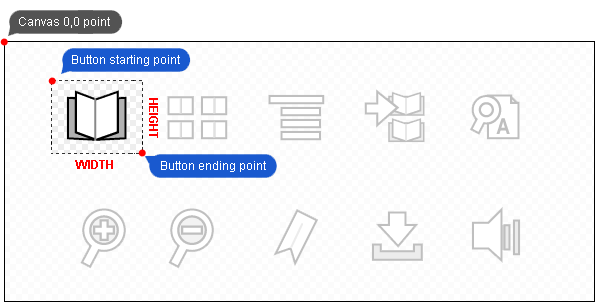
A media canvas is one image file on which all of the desired button states or other graphical elements are found. Knowing their positions in the media canvas, you will be able to select them with the Calaméo Skins syntax. Here is a simple canvas example:

How to use it
The CSML code to extract an image is very simple:
<button action="zoom"
    upState="mycanvas#0,0,35,35"
    overState="mycanvas#0,35,35,35"
    disabledState="mycanvas#0,70,35,35">
</button>
Let's have a look at overState="mycanvas#0,0,35,35": mycanvas refers to our media canvas file previously loaded by means of a media tag
The four coordinates are:
- abscissa (x-coordinate): distance between the left side of the canvas and your button
- ordinate (y-coordinate): distance between the top side of the canvas and your button
- width of the button
- height of the button